
Online monitoring and management
of the PrimeLink 3015 with firmware 2.0
Once you have upgraded to firmware 2.0 and have the right license, you can activate online monitoring and management of the PrimeLink 3015+ to access a range of functionalities, including the following:
- Remote control, such as updating configuration files (CIK files) and restarting
- Scripting for efficient distribution of CIK files across multiple PrimeLinks
- Monitoring of the performance of your PrimeLinks through SNMP or REST
- Event logging through Syslog
- Time synchronization of the logs through NTP
- Remote deactivation of connections through the Certificate Revocation List (CRL):
a list of revoked certificates.
To monitor and manage your PrimeLink 3015+ devices online, you need at least one Management PrimeLink. This will establish a unique connection with every device, a connection that is separate from the secure connections between your locations. This means monitoring and management cannot affect your secure connections.
Possible applications
Let us suggest a few possible applications for remote online monitoring and management of the PrimeLink 3015+.
Standard configuration
- Up to 128 concurrent connections
- Stacking of Management PrimeLinks is possible
- 1-on-n monitoring
- Upgrade to 1000+ connections on the roadmap
In the standard configuration, you can manage all your PrimeLink 3015 devices via a Management PrimeLink (every Management PrimeLink has up to 128 concurrent connections, and more connections are possible through stacking). You can activate, deactivate and configure connections as usual, with the Domain Administration System (DAS) and a configuration PC. The configuration PC will connect with your PrimeLink 3015 devices through the Management PrimeLink and will distribute CIK keys and configuration data.
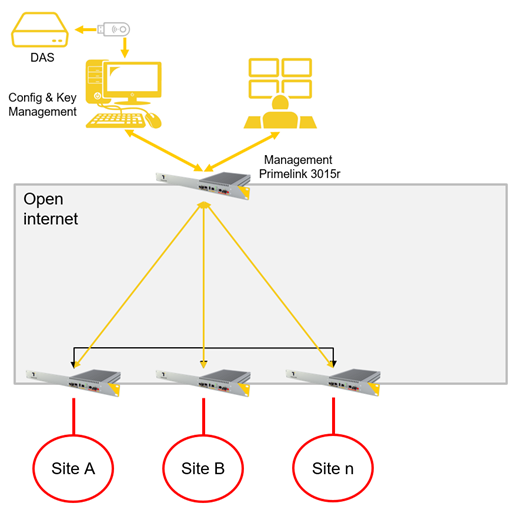
You can monitor the status and performance of connected devices in your own dashboard application via SNMP or REST. If you wish, you can monitor multiple devices simultaneously (1-on-n monitoring). Network configurations with grouped PrimeLinks can also be securely monitored using a single Management PrimeLink.
Redundancy
- Redundancy is possible
- Up to 3 Management PrimeLinks can be connected to an operational PrimeLink
- Different physical locations
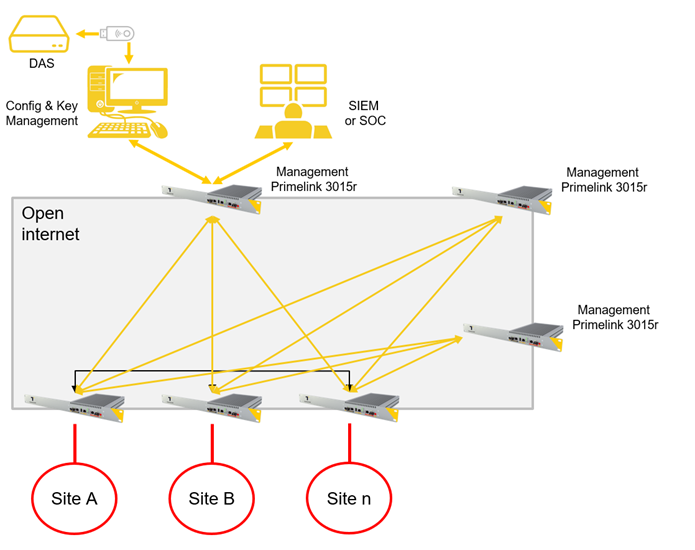
For optimal security, you can create redundancy by using up to three Management PrimeLinks for management and monitoring. They can be placed in different physical locations. This allows you to perform management tasks from multiple locations and it gives you control over your secure connections if one location is down.
Let’s talk about your encryption challenge
and find out how we can help you